Dark mode email design involves creating emails that display properly when users view them with dark background settings. The key is choosing colours that work in both light and dark modes, avoiding transparent backgrounds, and testing across different email clients. Proper dark mode optimisation ensures your emails remain readable and professional regardless of how subscribers view them.
What is dark mode and why does it matter for email design?
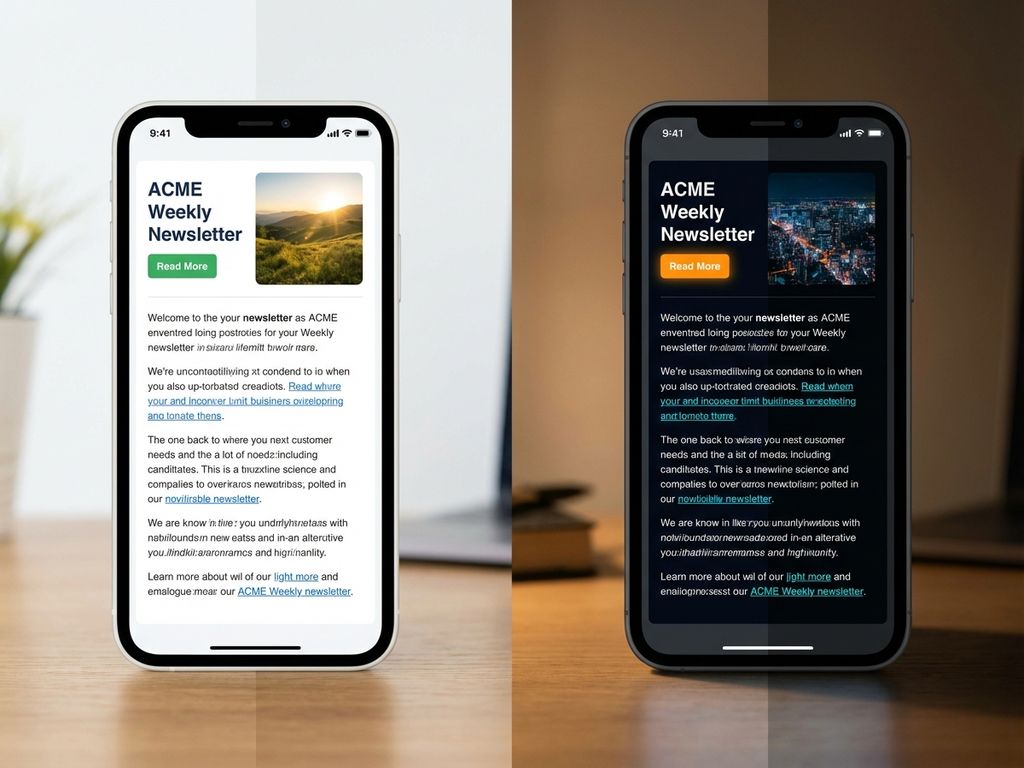
Dark mode inverts traditional colour schemes, displaying content with light text on dark backgrounds instead of dark text on light backgrounds. Most major email clients now support dark mode, including Apple Mail, Outlook, and Gmail, automatically converting emails when users enable this setting.
The popularity of dark mode has grown significantly as users appreciate reduced eye strain, especially during evening hours. Many professionals check emails throughout the day, making dark mode a preferred viewing option for comfort and battery conservation on mobile devices.
When emails aren’t optimised for dark mode, several issues arise. Text becomes unreadable, brand colours appear distorted, and images with transparent backgrounds create jarring visual breaks. Your carefully crafted email marketing platform campaigns can lose their professional appearance entirely.
Poor dark mode rendering damages brand perception. Subscribers may perceive your business as outdated or careless about user experience. This affects engagement rates and can lead to increased unsubscribes when emails consistently display poorly in dark mode.
How do you choose colours that work in both light and dark mode?
Start with high-contrast colour combinations that maintain readability across both viewing modes. Focus on colours that provide sufficient contrast ratios – aim for at least 4.5:1 for normal text and 3:1 for large text to meet accessibility standards.
Avoid pure white (#FFFFFF) and pure black (#000000), as these create harsh contrasts when modes switch. Instead, use off-white colours like #F8F9FA for light backgrounds and dark greys like #1A1A1A for dark elements. These softer alternatives provide better visual comfort.
CSS media queries allow you to detect dark mode and apply specific styling. Use the prefers-color-scheme media query to define alternative colour palettes. However, remember that email client support varies, so your primary colours should work reasonably well in both modes.
Create a colour palette hierarchy that maintains your brand identity while ensuring functionality. Choose primary brand colours that translate well to both modes, and develop secondary palettes specifically for dark mode viewing. Test how your brand colours appear when email clients automatically invert them.
Consider colour temperature when making selections. Warmer colours often translate better across different viewing modes, while very cool blues and greens can become problematic in certain dark mode implementations.
What are the biggest mistakes people make with dark mode email design?
Using transparent backgrounds on images creates the most common and jarring dark mode problems. Images designed with transparent backgrounds for light mode suddenly have dark backgrounds showing through, making logos and graphics appear unprofessional or completely unreadable.
Many designers ignore text readability issues, assuming email clients will handle conversions automatically. Light grey text that works perfectly on white backgrounds becomes nearly invisible when displayed on dark backgrounds. Always specify text colours explicitly rather than relying on default settings.
Inadequate contrast testing leads to accessibility problems and poor user experience. Designers often test only in their preferred viewing mode, missing how colours interact when automatically converted. This oversight affects subscribers who rely on dark mode for visual comfort.
Another significant mistake involves assuming all email clients handle dark mode identically. Different email clients implement dark mode differently – some invert colours automatically, others respect your CSS specifications, and some do both depending on the element.
Failing to optimise call-to-action buttons for dark mode severely impacts conversion rates. Buttons that stand out beautifully in light mode can become invisible or unappealing when colour schemes invert, directly affecting your campaign effectiveness.
How do you test your emails to make sure they look good in dark mode?
Test across multiple email clients and devices systematically, as each handles dark mode differently. Start with the most popular clients your subscribers use – typically Apple Mail, Gmail, and Outlook – on both desktop and mobile versions.
Enable dark mode on your testing devices and email clients manually. Don’t rely solely on preview tools, as they may not accurately represent how different clients render your emails. Physical device testing reveals real-world display issues that automated tools miss.
Use email testing services that offer dark mode preview capabilities. Tools like Email on Acid and Litmus provide dark mode testing across various clients, though they should supplement rather than replace manual testing on actual devices.
Create a testing checklist that covers text readability, image backgrounds, button visibility, and overall layout integrity. Check that your brand colours maintain their intended impact and that no elements become invisible or difficult to interact with.
Test at different times of day when you’re naturally in different lighting conditions. Dark mode emails that look perfect in bright office lighting might reveal issues when viewed in dim environments where subscribers typically prefer dark mode.
Document how your emails appear across different clients and create guidelines for future campaigns. This knowledge helps you make informed design decisions and ensures consistency across all your email marketing efforts.
How Deployteq helps with dark mode email design
Deployteq provides comprehensive solutions for creating emails that look professional in both light and dark modes. Our platform addresses all the critical aspects of dark mode optimisation through advanced features and built-in testing capabilities:
• Automatic dark mode testing across 90+ email clients and devices, showing you exactly how your emails render in different viewing modes
• Smart colour palette tools that suggest optimal colour combinations maintaining brand consistency while ensuring readability
• Pre-built responsive templates designed with dark mode compatibility from the ground up
• Real-time preview functionality allowing you to switch between light and dark modes instantly during design
• Advanced CSS support including prefers-color-scheme media queries for sophisticated dark mode implementations
• Image optimisation features that detect and flag potential transparent background issues before sending
Ready to create professional emails that look brilliant in both light and dark mode? Book a demo to see how our platform handles responsive design across all viewing preferences, or contact us to discuss your specific dark mode optimisation needs.